Building My First Custom Environment with Unity ML-Agents (and Why It Didn't Learn)
In the previous post, we trained the 3DBall example and confirmed that our setup works. Training an environment someone else built is a good start, but the real fun begins when you design your own.
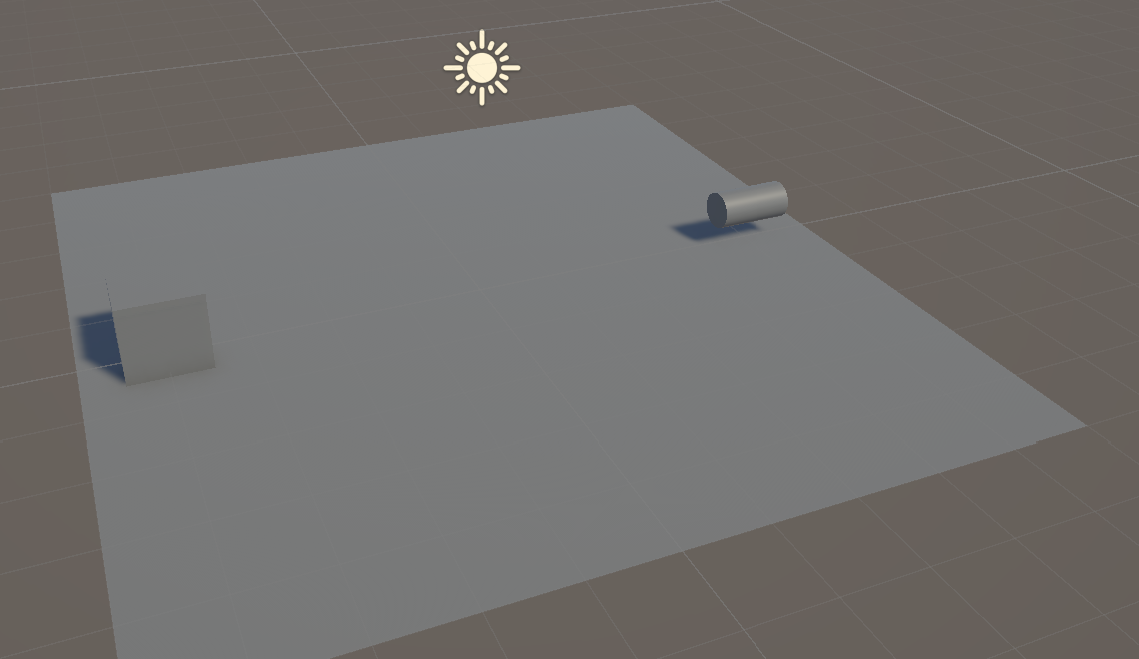
So I built one: the Ball Avoider. A cannon fires bullets at an agent, and the agent has to learn to jump over them.
Spoiler: my first version didn’t learn anything. After more than a dozen training runs, the agent was still getting hit almost every time. In this post I’ll show you how the environment works, what went wrong and how I fixed it. Honestly, the mistakes are the most useful part.
The Idea
I wanted the simplest task I could think of that still requires a real decision. The agent has:
- One action: jump or don’t jump.
- One goal: don’t get hit.
The challenge is timing. If the agent jumps too early, it is already falling back down when the bullet arrives. If it jumps too late, it gets hit.
Step 1: The Training Area
Everything lives inside a prefab called TrainingArea:
- Floor: A plane with the tag
Floor. - Agent: A cube with a
Rigidbody. It has three components:Behavior Parameters,Decision Requesterand my ownAvoiderAgentscript. - Cannon: A small cylinder. Every 3 seconds, it fires a bullet toward the agent.
- Bullet: A separate prefab: a small sphere with a
Rigidbodyand gravity turned off. It destroys itself after 1.5 seconds.
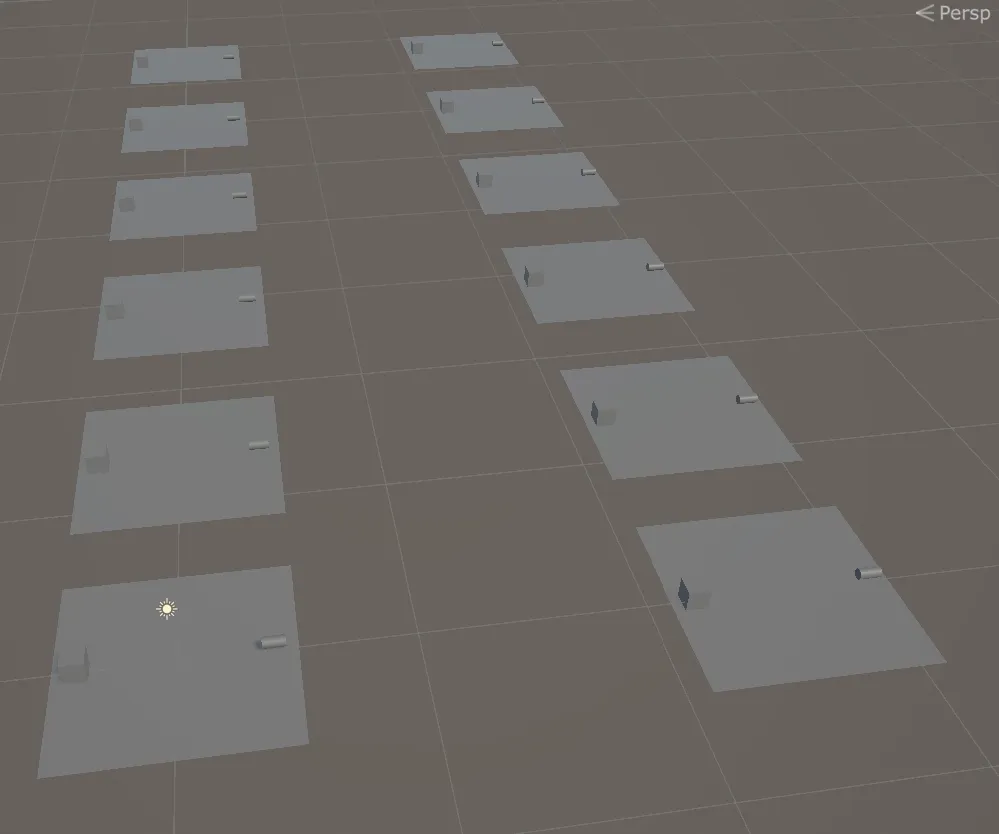
Just like in 3DBall, I placed 12 copies of the training area in the scene so that 12 agents train at the same time.
Tip: Keep the copies far enough apart that a bullet from one area can never reach the agent in another one.
Step 2: The Agent Script
To create an agent, you write a class that inherits from Agent and override a few methods. These are the ones I used:
| Method | When it is called | What I use it for |
|---|---|---|
Initialize() | Once, at startup | Cache the Rigidbody |
OnEpisodeBegin() | At the start of every episode | Reset the ball |
CollectObservations() | Every time the agent makes a decision | Tell the agent what it can “see” |
OnActionReceived() | Every time an action is applied | Make the ball jump |
Heuristic() | When there is no model, or in Heuristic mode | Control the agent with the keyboard |
On top of that, you give rewards with AddReward() or SetReward(), and you finish an episode with EndEpisode().
The Decision Requester component decides how often the agent makes a decision. I set its Decision Period to 5, so the agent decides every 5 physics steps (every 0.1 seconds). With Take Actions Between Decisions enabled, the last action is repeated in between.
This was my first version (You can find all the code here):
AvoiderAgent.cspublic class AvoiderAgent : Agent
{
    [SerializeField] private float JumpForce = 10f;

    private Rigidbody _rb;
    private Transform _trackedBullet;
    private bool _jumpIsReady = true;

    public override void Initialize()
    {
        _rb = GetComponent<Rigidbody>();
    }

    public void TrackBullet(Transform bullet)
    {
        _trackedBullet = bullet;
    }

    public override void OnEpisodeBegin()
    {
        _rb.angularVelocity = Vector3.zero;
        _rb.linearVelocity = Vector3.zero;
        transform.localPosition = new Vector3(-4, 0.5f, 0);
        _jumpIsReady = true;
    }

    public override void CollectObservations(VectorSensor sensor)
    {
        sensor.AddObservation(_trackedBullet != null ? _trackedBullet.GetComponent<Rigidbody>().linearVelocity : Vector3.zero);
    }

    public override void OnActionReceived(ActionBuffers actionBuffers)
    {
        var signal = actionBuffers.ContinuousActions[0];

        if (Mathf.Floor(signal) == 1)
        {
            if (_jumpIsReady)
            {
                _rb.AddForce(Vector3.up * JumpForce, ForceMode.Impulse);
                _jumpIsReady = false;
            }
        }
    }

    public override void Heuristic(in ActionBuffers actionsOut)
    {
        var continuousActionsOut = actionsOut.ContinuousActions;
        continuousActionsOut[0] = 0;

        var keyboard = Keyboard.current;

        if (keyboard != null)
        {
            if (keyboard.spaceKey.isPressed)
            {
                continuousActionsOut[0] = 1;
            }
        }
    }

    void OnCollisionEnter(Collision other)
    {
        if (other.gameObject.CompareTag("Floor"))
        {
            _jumpIsReady = true;
        }

        if (_trackedBullet != null)
        {
            Destroy(_trackedBullet.gameObject);
        }
        _trackedBullet = null;

        SetReward(-3f);
        EndEpisode();
    }
}
The bullet gave the reward for a successful dodge when it was destroyed:
Bullet.csvoid Start()
{
    Destroy(gameObject, 1.5f);
}

void OnDestroy()
{
    _agent.SetReward(1f);
}
Step 3: The First Training Attempts
I started with this configuration:
avoider_config.yamlbehaviors:
  AvoiderAgent:
    trainer_type: ppo
    hyperparameters:
      batch_size: 10
      buffer_size: 100
      learning_rate: 3.0e-4
      beta: 5.0e-4
      epsilon: 0.2
      lambd: 0.99
      num_epoch: 3
      learning_rate_schedule: linear
      beta_schedule: constant
      epsilon_schedule: linear
    network_settings:
      normalize: false
      hidden_units: 128
      num_layers: 2
    reward_signals:
      extrinsic:
        gamma: 0.99
        strength: 1.0
    max_steps: 1000000
    time_horizon: 64
    summary_freq: 10000
I trained it the same way as in the previous post:
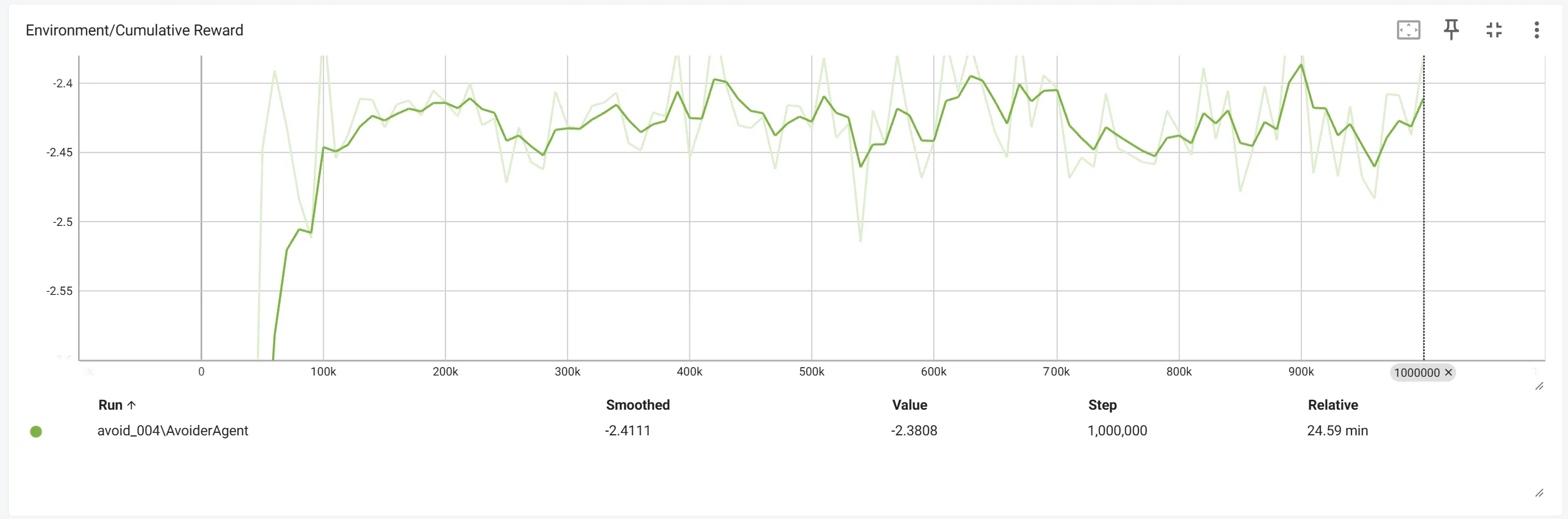
mlagents-learn Assets/Samples/BallAvoider/avoider_config.yaml --run-id=avoider_001And I waited… and nothing happened. After about 1 million steps, the mean reward was still around -2.4, very close to the -3 hit penalty. The average episode lasted only 16 to 32 decisions, which is roughly 1.5 to 3 seconds of game time. I tweaked values and tried again, with the same result.
What Went Wrong
When I finally stopped tweaking numbers and reviewed the environment carefully, I found several problems. Some were plain bugs, and others were design mistakes that made the task impossible to learn.
Mistake 1: Landing Counted as Being Hit
Look at OnCollisionEnter again. When the ball touched the floor, it re-enabled the jump… and then kept going, gave the -3 penalty and ended the episode. Every landing after a jump counted as being hit, so even a perfect jump ended with -3. From the agent’s point of view, jumping was always a bad idea, and the reward could never get far from -3.
The fix for this one is easy:
AvoiderAgent.csvoid OnCollisionEnter(Collision other)
{
    if (other.gameObject.CompareTag("Floor"))
    {
        _jumpIsReady = true;
        return;
    }
    // ...
}
Tip: Play your environment yourself before training it. Set Behavior Type to Heuristic Only in the
Behavior Parameterscomponent, press Play and control the agent with your keyboard. With this bug, the ball would jump back to its starting position every time it landed. I would have spotted it in seconds.
Mistake 2: The Agent Couldn’t See What Mattered
The only observation was the bullet’s velocity. But all bullets fly at the same speed, so that value was always (-10, 0, 0), or zero when there was no bullet. It told the agent that a bullet existed, but not where it was. Without knowing how far away the bullet is, the agent has no way to time its jump.
I replaced it with five observations:
- Whether there is a bullet right now (1 or 0).
- The distance from the bullet to the agent, divided by 8 so that it stays between -1 and 1.
- The height of the ball.
- The vertical speed of the ball.
- Whether the ball can jump.
Mistake 3: Rewards in the Wrong Place
There were two problems here.
SetReward vs AddReward. SetReward replaces the reward for the current step, and AddReward adds to it. In most cases, AddReward is the one you want.
Giving the reward in OnDestroy. OnDestroy also runs when the agent destroys a bullet that just hit it. In Unity, Destroy happens at the end of the frame, after EndEpisode(), so the +1 “dodge” reward ended up in the next episode. On top of that, OnDestroy also runs when the scene closes, which can throw errors.
Now the bullet checks when it has passed the agent, and only then tells the agent to reward itself:
Bullet.csvoid FixedUpdate()
{
    if (_passedAgent || _agent == null) return;

    if (transform.position.x < _agent.transform.position.x - PassMargin)
    {
        _passedAgent = true;
        _agent.BulletDodged(transform);
    }
}
Mistake 4: A Continuous Action for a Yes/No Decision
My action was a continuous value between -1 and 1, and the ball jumped only when Mathf.Floor(signal) == 1, which happens only when the value is exactly 1. That works, but it is an awkward way to express a yes/no decision.
ML-Agents has discrete actions for this. A branch of size 2 gives the agent exactly two options: 0 (stay) or 1 (jump).
Mistake 5: The Cannon Didn’t Know About Episodes
The cannon fired on its own timer and never reset. A new episode could start with a bullet already halfway to the agent, at any point in the 3-second cycle. Now the agent resets the cannon at the start of every episode, which removes any bullet in flight and restarts the timer.
Mistake 6: Tiny Training Batches
With buffer_size: 100, the trainer updated the model after only about 8 decisions per agent, which is less than a second of play. Most of those updates didn’t even include a bullet. With batch_size: 10, each training step was based on just 10 samples, so the updates were very noisy.
Step 4: The Fixed Version
This is the agent after all the fixes:
AvoiderAgent.cspublic class AvoiderAgent : Agent
{
    [SerializeField] private Cannon Cannon;
    [SerializeField] private float JumpForce = 10f;
    [SerializeField] private float DodgeReward = 1f;
    [SerializeField] private float HitPenalty = -1f;
    [SerializeField] private float JumpPenalty = -0.1f;
    // Used to scale the bullet distance observation to roughly [-1, 1]
    [SerializeField] private float MaxBulletDistance = 8f;

    private Rigidbody _rb;
    private Transform _trackedBullet;
    private bool _jumpIsReady = true;

    public override void Initialize()
    {
        _rb = GetComponent<Rigidbody>();
    }

    public void TrackBullet(Transform bullet)
    {
        _trackedBullet = bullet;
    }

    public void BulletDodged(Transform bullet)
    {
        if (bullet != _trackedBullet) return;

        AddReward(DodgeReward);
        _trackedBullet = null;
    }

    public override void OnEpisodeBegin()
    {
        _rb.angularVelocity = Vector3.zero;
        _rb.linearVelocity = Vector3.zero;
        transform.localPosition = new Vector3(-4, 0.5f, 0);
        transform.localRotation = Quaternion.identity;
        _jumpIsReady = true;
        _trackedBullet = null;

        Cannon.ResetCannon();
    }

    public override void CollectObservations(VectorSensor sensor)
    {
        var hasBullet = _trackedBullet != null;
        var bulletDistance = hasBullet
            ? (_trackedBullet.position.x - transform.position.x) / MaxBulletDistance
            : 1f;

        sensor.AddObservation(hasBullet ? 1f : 0f);
        sensor.AddObservation(bulletDistance);
        sensor.AddObservation(transform.localPosition.y);
        sensor.AddObservation(_rb.linearVelocity.y / JumpForce);
        sensor.AddObservation(_jumpIsReady ? 1f : 0f);
    }

    public override void OnActionReceived(ActionBuffers actionBuffers)
    {
        var jump = actionBuffers.DiscreteActions[0] == 1;

        if (jump && _jumpIsReady)
        {
            _rb.AddForce(Vector3.up * JumpForce, ForceMode.Impulse);
            _jumpIsReady = false;
            AddReward(JumpPenalty);
        }
    }

    public override void Heuristic(in ActionBuffers actionsOut)
    {
        var discreteActionsOut = actionsOut.DiscreteActions;
        discreteActionsOut[0] = 0;

        var keyboard = Keyboard.current;

        if (keyboard != null && keyboard.spaceKey.isPressed)
        {
            discreteActionsOut[0] = 1;
        }
    }

    void OnCollisionEnter(Collision other)
    {
        if (other.gameObject.CompareTag("Floor"))
        {
            _jumpIsReady = true;
            return;
        }

        if (other.gameObject.GetComponent<Bullet>() != null)
        {
            AddReward(HitPenalty);
            EndEpisode();
        }
    }
}
The rewards are now:
- +1 for every bullet dodged.
- -1 for getting hit, which also ends the episode.
- -0.1 for every jump.
Why punish jumping? A jump keeps the agent in the air for a long time. Without a cost, the agent could simply jump all the time and dodge most bullets without learning any timing. The small penalty should push it to jump only when it’s needed.
The cannon now has a ResetCannon() method that the agent calls in OnEpisodeBegin():
Cannon.cspublic void ResetCannon()
{
    if (_activeBullet != null)
    {
        Destroy(_activeBullet.gameObject);
    }
    _activeBullet = null;
    _timeSinceLastShot = 0f;
}
Finally, the new code also needs some changes to the agent’s components:
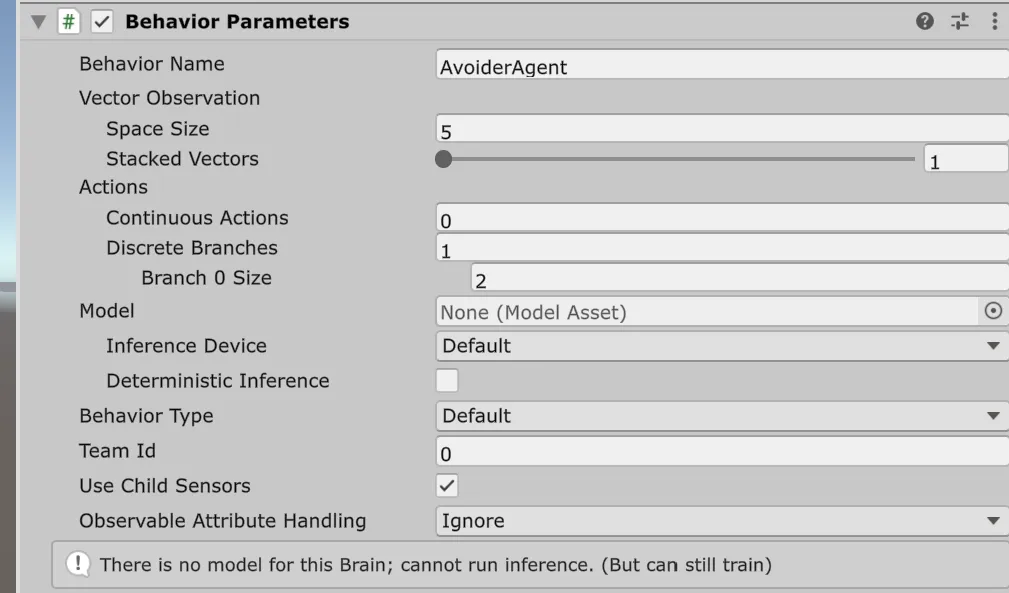
- Behavior Parameters: Vector Observation Space Size set to 5, Continuous Actions set to 0, and one Discrete Branch of size 2.
- Max Step: set to 1000 (about 20 seconds). Without a limit, an agent that learns to dodge everything never finishes an episode, and the reward charts have nothing to show.
- Cannon: drag the cannon into the new field of the
AvoiderAgentcomponent.
Step 5: Training Again
I also updated the training configuration:
avoider_config.yamlbehaviors:
  AvoiderAgent:
    trainer_type: ppo
    hyperparameters:
      batch_size: 64
      buffer_size: 2048
      learning_rate: 3.0e-4
      beta: 5.0e-3
      epsilon: 0.2
      lambd: 0.95
      num_epoch: 3
      learning_rate_schedule: linear
      beta_schedule: linear
      epsilon_schedule: linear
    network_settings:
      normalize: false
      hidden_units: 64
      num_layers: 2
    reward_signals:
      extrinsic:
        gamma: 0.99
        strength: 1.0
    max_steps: 300000
    time_horizon: 64
    summary_freq: 10000
These are the values I changed and why:
| Setting | Before | After | Why |
|---|---|---|---|
buffer_size | 100 | 2048 | Collect about 6 bullets per agent before each update, instead of less than one |
batch_size | 10 | 64 | Less noisy training steps |
beta | 5.0e-4 | 5.0e-3 | Keep exploring longer, so the jump penalty doesn’t make the agent stop jumping too early |
beta_schedule | constant | linear | Explore a lot at the start and less at the end |
lambd | 0.99 | 0.95 | The ML-Agents default |
hidden_units | 128 | 64 | 5 inputs and 2 options don’t need a big network |
max_steps | 1,000,000 | 300,000 | A task this small should learn much sooner |
To start the training:
mlagents-learn Assets/Samples/BallAvoider/avoider_config.yaml --run-id=avoider_fixed_002
With these changes, the result is completely different: the cumulative reward climbs to 4.5.
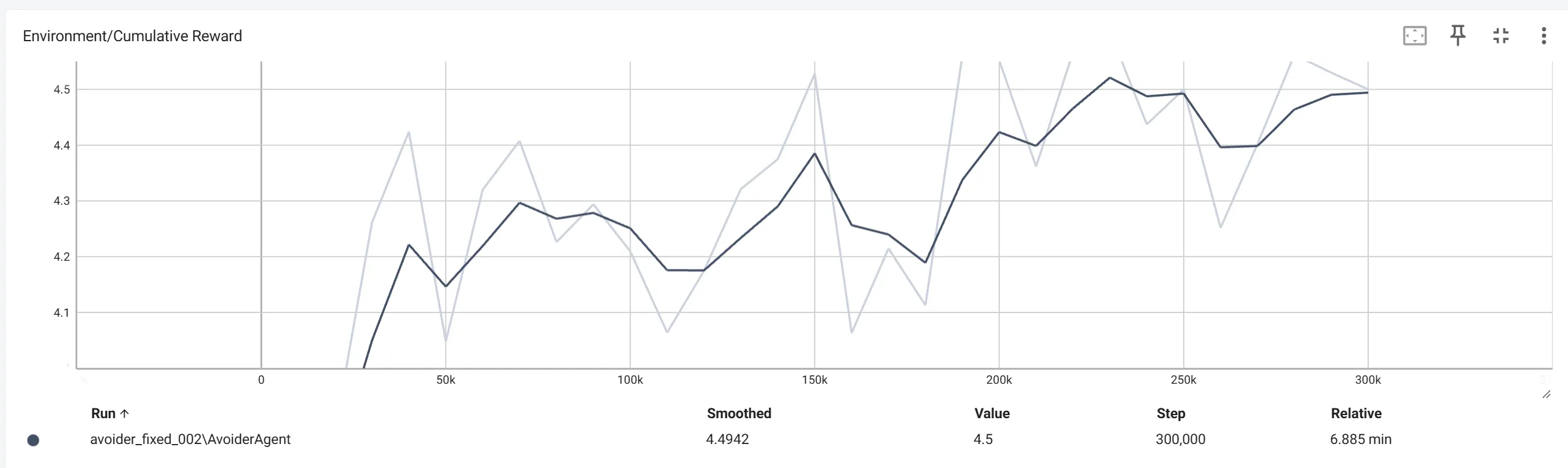
To use the trained model, follow the same steps as in the previous post: drag the .onnx file into Unity and assign it to the Model field of the Behavior Parameters component.
One last thing to keep in mind: although the agent now avoids the bullets, the jump penalty doesn’t seem to be big enough to stop it from jumping all the time. To get better results, I’d need more training runs tweaking the reward and penalty values.
Conclusion
These are my main takeaways:
- Play the environment yourself first. Heuristic mode would have revealed my worst bug in seconds.
- Check the observations. If you couldn’t solve the task with only the numbers the agent gets, the agent can’t either.
- Give rewards at the right moment. Use
AddReward, and make sure every reward lands in the episode where it was earned. - Choose the right action type. Yes/no decisions are a perfect fit for discrete actions.